
Google is rolling out a free AI agent for Google Business Profiles. Once it’s on, it answers customer messages from Search and Maps for you: questions about your services, pricing and availability, and even bookings. When it can’t answer something, it hands the conversation back to you.
I think this is going to be massive for local businesses. Below is how to turn it on, then my take on why it matters, what’s going to stop a lot of owners from using it, and how to set your profile up so the agent actually gives good answers.
How to turn on the AI agent for your Google Business Profile
Right now Google is only offering this to select eligible businesses, in certain categories and countries. If you’re eligible, Google will email you an invite to “Activate your AI agent.” Here’s what that email looks like:

- Check if you’re eligible. Look for the invite email. You can also sign in to the Google account that manages your profile, search your business name or “my business,” and look for the Messages option in your profile’s management panel. If you don’t see it, it hasn’t reached your business yet.
- Start the activation. Click “Activate your AI agent” in the email, or open Messages in your management panel. Read through how AI-powered messaging works, then follow the on-screen instructions.
- Complete the business confirmation. Google asks for:
- Your legal, registered business name and address
- Your first and last name
- A valid business email address and phone number
- Your website or an official social media profile
- Links to your Privacy Policy and Terms of Service
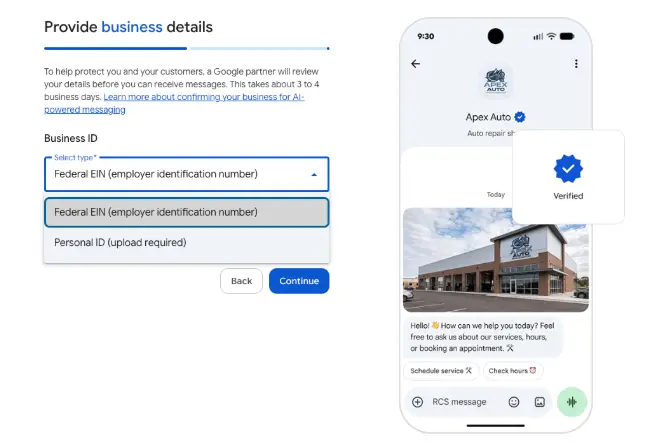
- Your Federal EIN or a personal ID
- Approve the confirmation email. Google sends you an email, and the review doesn’t start until you approve it. Once Google approves you, AI messaging goes live on your profile.
- Add a chat phone number. Make sure your Business Profile has a chat number entered.
- Monitor your messages. Search your business on Google and select Messages, or open the Inbox in Google Business Home. Conversations are split into two groups: “AI agent” (the AI is handling it) and “Needs your attention” (you need to reply). Select “Take over and reply manually” to jump in yourself, and “Resume AI agent” to hand it back.
These steps are based on Dipa Gandhi’s guide in the Google Business Profile Help Community.
Why I think this is huge for local businesses
Google’s main goal is to give its users the best experience and the best results for what they’re looking for. An AI agent that’s trained on your business and knows all of your information fits that goal perfectly.
I also think it’s going to affect rankings. People who can interact with your profile, even if it’s with an AI agent, are going to convert a lot more. They can get pricing and more information on the specific service they need without leaving Google.
Think of it like having a receptionist who is the most knowledgeable person in your business. And just like a good receptionist, when they can’t answer a question, they say “hold on, let me go grab the owner” or “let me grab the tech,” get the answer, and come back to relay it. It’s a receptionist on steroids. It can check your schedule and availability, and it can make sales at the same time.
And Google is giving it to you for free. They’re doing it to help their users, but helping searchers find the right business ends up helping businesses too.
The ID verification is going to scare a lot of owners off
I think the biggest thing stopping people will be the EIN or personal ID step. Nobody trusts big tech, so a lot of owners will skip it.
But if you run Facebook ads, you’ve probably already verified your ID with Meta. Same with Shopify. People forget they’ve already handed their ID to big tech. When you travel to another country, they scan your passport and it ends up on a piece of paper somewhere. When you buy something at a store, someone looks at your ID or scans it. Identity theft is real, but whoever wants to steal your identity needs a lot more than what’s on that card.
My prediction: many owners will hold off at first, until they realize their competitors are getting all of the business and they’re leaving a ton of money on the table.
You also have to re-verify your profile, which is annoying. I think it’s a good thing, though, because it’ll cut out a lot of junk profiles that aren’t legit, or that got grandfathered in after verifying a location the wrong way.
You need a privacy policy and terms of service
Google asks for links to both. If your website doesn’t have them, set them up as soon as possible. You need them anyway if you run any kind of ads, and they’re standard on websites now. You can generate both with ChatGPT, Claude or any other AI, but get a lawyer to review them.

Which countries get it first?
The form asks for a Federal EIN, which is a US number. Google hasn’t said which countries or business types get it first. We’re in Canada, and so far the activation emails we’ve seen have come in for our US clients. We’ll post on the HeyTony social accounts as it opens up in more countries.
Set up your profile so the agent gives good answers
The agent can only answer with what Google knows about your business. That means your Google Business Profile and your website need to be complete before you turn it on, especially your pricing.
Your profile already matters a lot for AI recommendations. Google’s AI Mode pulls straight from Business Profiles. In my latest YouTube video, we tested 25 local businesses, and 21 of them were being recommended by Google’s AI because of their Business Profiles.
Here’s what to fix before you activate:
- List each service individually on your profile, and only the services you actually offer
- Add pricing, even if it’s “starts at” pricing
- Write a description for each service
- Build an individual page on your website for each service, matching what’s on your profile
- Add a clear booking or contact link to your profile, and make it obvious on your website where people book or call
- Say how quickly you can serve people: emergency service, same-day appointments, and so on
Reply fast when the agent hands off
The handoff appears to run over texting (SMS or RCS), so you need a phone number that can send and receive texts. In Canada, Google phone numbers can’t receive texts right now, so use a real mobile number. Landlines won’t work either, and neither will a line with an answering machine or a “press 1” menu. Switching that number over is going to be annoying for a lot of businesses, but it’s worth it.
When a conversation lands in “Needs your attention,” reply as fast as you can. Ideally, someone’s job is to monitor that number. People are impatient, especially now that they’re used to instant answers from AI. They’re probably messaging a few businesses at once to compare quotes, availability, and pricing. If you take longer than a couple of minutes, you could lose the job.
Even with all that, every business should turn this on. It helps real people, and helping real people gets your business in front of more of them.
Agents are already talking to agents
At Google I/O in May, Google announced it’s expanding agentic booking in Search to local experiences and services. For categories like home repair, beauty and pet care, people can also ask Google to call businesses for them.
This is already happening. Members of HeyTony Insiders have been getting these calls for months, and you can’t even tell it’s an AI. Someone searches “car repair near me,” and Google asks if they want it to get a quote or check availability. It asks a few questions first, like the make and model of the car, how soon they need it and their budget. Then it calls a bunch of shops and emails the person its recommendations. Right now that answer comes by email, but I think it’ll get a lot quicker and happen right inside Search.
So if you have your own AI agent answering your phone, Google’s agent will end up talking to it. Your agent needs to be trained with everything about your business: basically a full handbook covering your services, quoting and pricing.
Google vs ChatGPT: you’ll want both
OpenAI just launched Businesses in ChatGPT in beta. ChatGPT has 1.2 billion weekly users, and now you can claim your business there, keep your info current and see how often you’re mentioned. ChatGPT also has an ID check, and it has its own AI agent for businesses.

To register your business with ChatGPT:
- Go to chatgpt.com/business-hub.
- Type in your business name and click Create.
- Verify your domain through DNS. If you don’t know how, ask AI to walk you through it.
- Verify your email and phone number.
- Verify your identity with your government ID.
That’s it. Your analytics will probably take a couple of days to come in.
| Google Business Profile AI agent | ChatGPT Business Agent | |
|---|---|---|
| Who can use it now | Select eligible businesses in certain categories and countries | Eligible ecommerce and online service businesses in the US (any eligible business can claim a profile) |
| Verification | Business details, privacy policy and terms links, EIN or personal ID | Domain (DNS), email, phone and government ID |
| What it answers from | Your Business Profile and website | Business info, product feeds and guidelines you add in Business Hub |
| Where customers find it | Messages in Google Search and Maps | Your business profile inside ChatGPT |
Google’s agent is free. ChatGPT also lets you sponsor your Business Agent through ChatGPT Ads.
If you’re a local service business, Google’s agent is the one to set up first, since ChatGPT’s agent is only open to ecommerce and online service businesses for now. Claim your ChatGPT profile anyway. Both platforms want proof you’re a real person, so go through the ID check once and get it done.
Want help getting your profile ready?
At HeyTony, we’re checking with each client before activating, since the owner has to verify with their own ID. As the agent rolls out to the profiles we manage, we’re getting them activated and filling in the services, pricing, and pages the agent needs to answer well.
If you want your business set up properly before your competitors figure this out, book a call with HeyTony.
Sources
- A new era for AI Search, Google, May 19, 2026
- How to Activate AI-Powered Messaging on Your Google Business Profile, Google Business Profile Help Community, Nov 3, 2026
- Claim your business in ChatGPT, OpenAI

Explore More